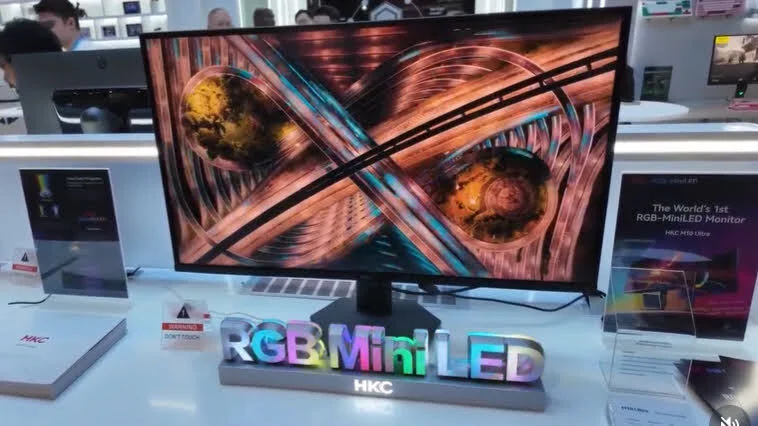
There’s a point where regular gaming monitors stop feeling exciting. You’ve seen the same promises before — better colors, faster refresh rates, deeper blacks. And honestly… a lot of them end up looking almost identical once they’re sitting on your desk. But the HKC M10 Ultra feels different. Not just because of the specs sheet, but because it’s trying to push display technology into a completely new direction.
Gamers, streamers, editors, and even competitive esports players are suddenly talking about the HKC M10 Ultra gaming monitor. Some people are calling it the future of Mini LED displays. Others think it could seriously challenge OLED panels without bringing OLED burn-in headaches into the mix. That’s a huge statement.
What makes this display stand out is the RGB Mini LED technology, insane brightness levels, extremely wide color coverage, and 4K 165Hz performance that actually feels premium instead of just sounding premium in marketing ads. And yeah, the hype around the HKC M10 Ultra review scene is growing fast for good reason.
But specs alone don’t sell a monitor anymore. Real-world experience matters. Smooth gameplay matters. Eye comfort matters. And price absolutely matters.
So if you’re wondering whether the HKC M10 Ultra is worth buying, whether it beats OLED, or if it’s just another expensive display with fancy branding, this guide breaks everything down in simple language without the usual robotic tech talk.
What Is the HKC M10 Ultra?
The HKC M10 Ultra is a premium 4K gaming monitor designed for high-end users who want serious image quality without compromising speed. It combines RGB Mini LED backlighting with a 165Hz refresh rate and advanced HDR performance. On paper, that already sounds impressive. But once you dig deeper, you realize this monitor is trying to solve some long-standing issues in the display industry.
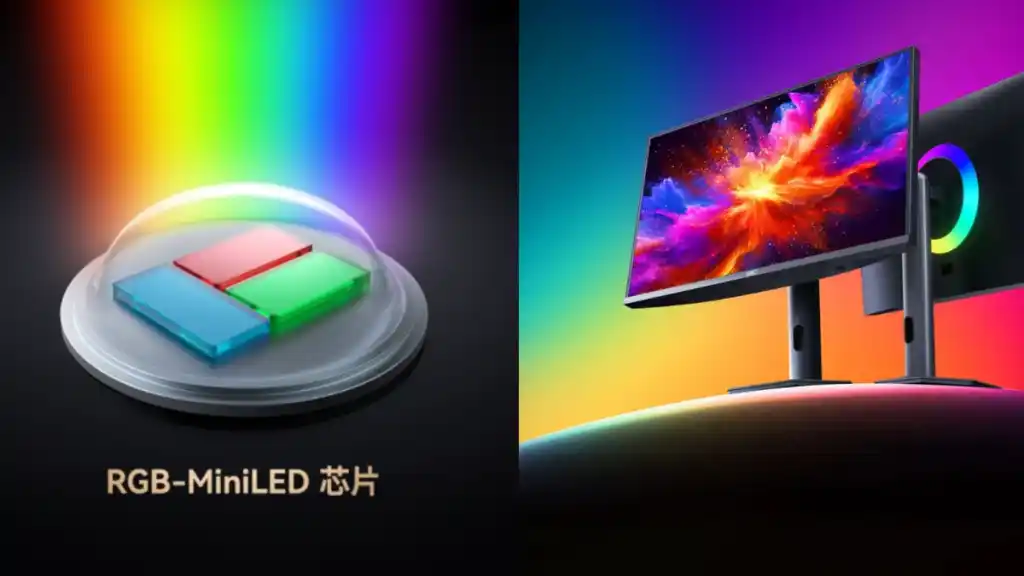
Traditional Mini LED monitors usually rely on white or blue backlighting. The HKC M10 Ultra RGB Mini LED system changes that by using independent red, green, and blue Mini LEDs. That means better color precision, stronger contrast, and reduced blooming effects around bright objects on dark scenes.
The monitor is expected to feature around 4,788 dimming zones, which is honestly wild for a consumer display. This gives the HKC M10 Ultra local dimming capabilities that push much closer to OLED-like blacks while maintaining higher brightness levels.
And brightness is one of the biggest selling points here. The HKC M10 Ultra brightness rating reportedly reaches around 1600 nits peak HDR brightness. That’s incredibly high for gaming and HDR content. Movies look dramatic. Games feel alive. Even desktop use looks cleaner and more vivid.
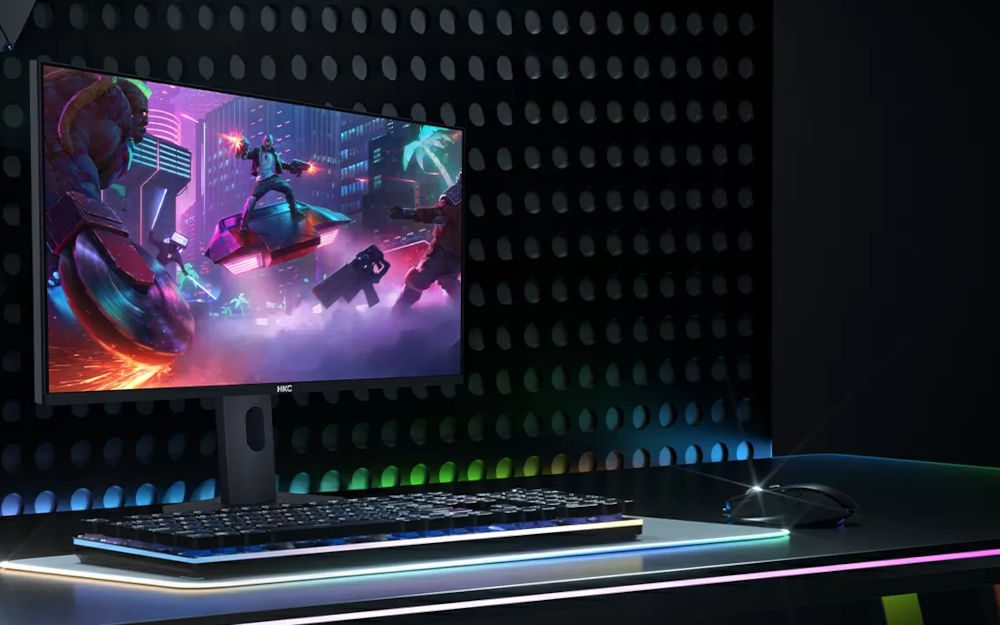
The panel also supports 4K resolution at 165Hz, making it suitable for both competitive gaming and creative workflows. So whether you’re editing videos, designing graphics, or grinding ranked matches at midnight, this monitor is built to handle it.
What’s interesting is how balanced the whole package feels. A lot of displays focus only on gaming or only on creators. The HKC M10 Ultra monitor seems to sit right in the middle — and that’s probably why people are paying attention.
Why the HKC M10 Ultra Matters
Display technology has felt a little stuck lately. OLED monitors became popular because of perfect blacks and instant response times, but they still carry concerns like burn-in, limited brightness in some scenarios, and expensive pricing. On the other hand, standard LCD and Mini LED monitors improved brightness but struggled with blooming and color depth.
The HKC M10 Ultra enters this situation at the perfect time.
This monitor matters because it tries to combine the strengths of both worlds. You get OLED-like contrast with Mini LED brightness. You get professional-grade color accuracy while still maintaining gaming-focused refresh rates.
That balance is hard to achieve.
The HKC M10 Ultra display quality is especially important for content creators. The monitor reportedly covers major color gamuts including sRGB, Adobe RGB, DCI-P3, and BT.2020 at extremely high levels. For photographers, video editors, and designers, that’s a serious advantage.
But gamers benefit too. Competitive players care about motion clarity and responsiveness. Story-driven gamers care about HDR immersion and deep blacks. The HKC M10 Ultra gaming experience aims to satisfy both groups without forcing compromises.
And then there’s future-proofing.
With DisplayPort 2.1 support expected on the HKC M10 Ultra, users can prepare for upcoming GPUs and next-generation gaming setups. That’s something buyers increasingly think about before spending premium money on a monitor.
Another reason this display matters is because it signals where the industry may be heading next. RGB Mini LED technology could become the bridge between traditional LCDs and expensive MicroLED displays. If the HKC M10 Ultra performs well in real-world testing, other brands will probably follow quickly.
And honestly… competition is good for everyone. When companies start pushing innovation harder, consumers get better products at more reasonable prices over time.
Key Features and Specifications of the HKC M10 Ultra
Here’s where things get exciting. The HKC M10 Ultra specs are stacked with premium features that target both hardcore gamers and professionals.
| Feature | HKC M10 Ultra |
|---|---|
| Resolution | 4K Ultra HD |
| Refresh Rate | 165Hz |
| Backlight | RGB Mini LED |
| Peak Brightness | Up to 1600 nits |
| Local Dimming Zones | Around 4,788 |
| HDR Support | Advanced HDR |
| Connectivity | DisplayPort 2.1 |
| Color Coverage | sRGB, DCI-P3, Adobe RGB, BT.2020 |
| Gaming Support | High refresh gaming |
| Use Case | Gaming + Creative Work |
One of the biggest highlights is the HKC M10 Ultra 165Hz refresh rate. A 4K monitor running at 165Hz delivers extremely smooth gameplay, especially when paired with modern GPUs. Fast shooters, racing games, and esports titles feel responsive and fluid.
The HDR implementation also seems far beyond typical gaming monitors. Most HDR displays claim big numbers but fail in actual scenes because of poor local dimming. The HKC M10 Ultra local dimming system changes that with thousands of dimming zones controlling brightness more precisely.
Then there’s color performance. This monitor isn’t just aimed at gamers screaming into headsets. It’s also clearly targeting professional users who care about accurate tones, gradients, and cinematic visuals.
The HKC M10 Ultra professional monitor approach makes it appealing for hybrid users — people who work during the day and game at night.
And yes, aesthetics matter too. Premium monitors today need sleek bezels, modern stands, and cleaner cable management. While final retail designs may vary, the HKC M10 Ultra premium monitor styling already looks more refined than many generic gaming displays flooding the market.
RGB Mini LED Technology Explained
The biggest talking point around the HKC M10 Ultra is definitely the RGB Mini LED technology.
If you’ve used standard Mini LED displays before, you already know they improve brightness and HDR compared to normal LCDs. But they still rely on white or blue backlighting filtered into colors. That process can reduce efficiency and create slight inaccuracies.
The HKC M10 Ultra RGB Mini LED system works differently.
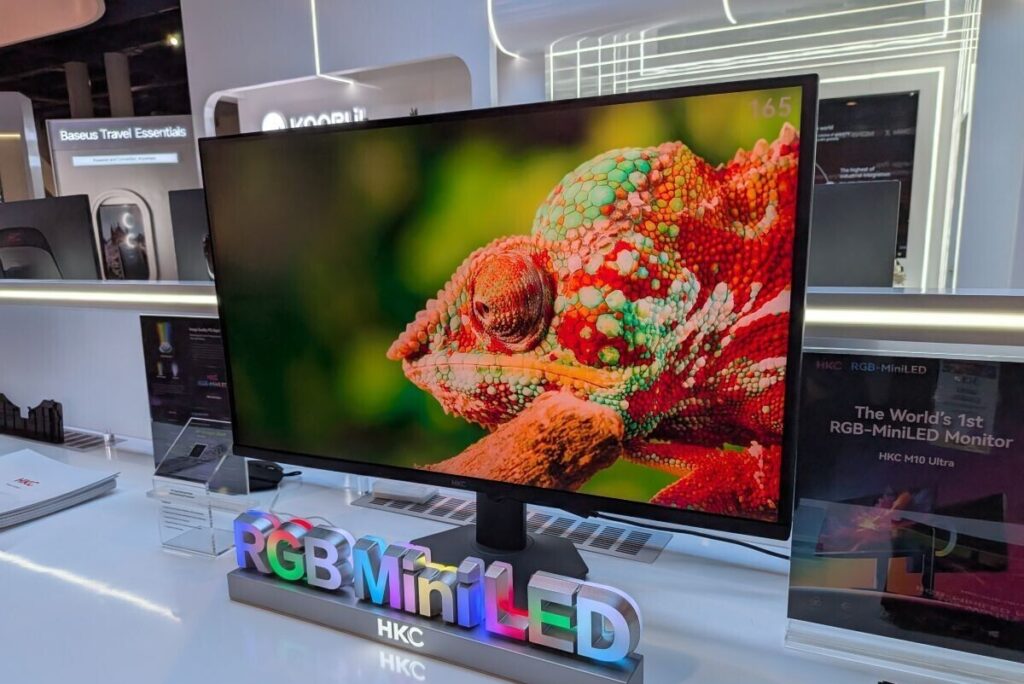
Instead of filtering white light into colors, it directly uses separate red, green, and blue Mini LEDs. This allows more precise color control and stronger color purity. Blacks appear deeper. Highlights pop harder. Colors feel cleaner and less washed out.
That’s the theory anyway.
In practice, this could help reduce one of the biggest Mini LED complaints: blooming. Blooming happens when bright objects create glowing halos around dark backgrounds. Since the HKC M10 Ultra dimming zones are highly advanced, those halos should become less noticeable.
And for HDR gaming, that’s huge.
Imagine dark horror scenes with tiny light sources. Or bright explosions in shooters. Or neon city lights in cyberpunk-style games. The monitor can isolate brightness more accurately instead of lighting giant portions of the screen unnecessarily.
This is why people are comparing the HKC M10 Ultra vs OLED debate so aggressively online. OLED still wins in true pixel-level lighting, but RGB Mini LED could narrow the gap while avoiding OLED weaknesses.
It’s still early technology though. And early-generation products sometimes come with quirks. Firmware tuning, dimming algorithms, and optimization all matter a lot. So real-world reviews will ultimately decide how successful this display becomes.
Still, the potential here is massive.
Gaming Performance and Refresh Rate
Gaming is where the HKC M10 Ultra could really dominate.
A 4K 165Hz setup already sounds premium. But pairing that with strong HDR and advanced dimming creates a much more immersive experience than typical gaming monitors.
The HKC M10 Ultra gaming monitor targets both competitive and cinematic gamers. Fast response times help reduce blur during quick movements, while the high refresh rate keeps gameplay smooth and responsive.
Competitive players may appreciate the motion clarity in games like Valorant, Apex Legends, or Call of Duty. And yes, some hardcore esports players still prefer 240Hz or higher. But for most users, 165Hz at 4K feels incredibly balanced.
And cinematic gamers? They’re probably the biggest winners here.
Open-world games benefit massively from HDR brightness and richer color depth. The HKC M10 Ultra HDR performance can make sunsets, reflections, and shadows feel dramatically more realistic.
Console users may also find this monitor appealing. The HKC M10 Ultra for PS5 and Xbox gaming should support high-end visual features that modern consoles are built for. High refresh support, HDR, and 4K detail all matter more now than ever.
There’s also a practical side to gaming comfort. Brightness consistency, reduced flickering, and accurate contrast can help reduce eye strain during long sessions. That may sound small, but anyone who spends six hours gaming straight knows it matters.
And honestly… monitors are becoming long-term investments now. People keep them for years. So buying something future-ready makes more sense than ever.
HDR and Color Accuracy on the HKC M10 Ultra
The HKC M10 Ultra color accuracy could become one of its strongest selling points.
A lot of gaming monitors look vibrant in stores but perform poorly in professional workloads. Colors become oversaturated, gradients look uneven, and calibration options feel limited.
This monitor seems different.
Reports suggest the HKC M10 Ultra color gamut coverage reaches extremely high levels across multiple professional standards. That includes Adobe RGB and DCI-P3, which are important for photographers, filmmakers, and designers.
The HDR side is equally impressive.
Most fake HDR monitors advertise support but don’t have the brightness or local dimming to make HDR meaningful. The HKC M10 Ultra HDR performance appears much closer to real premium HDR displays.
Bright scenes gain intensity. Dark scenes maintain detail. And contrast feels more dramatic without crushing blacks completely.
That’s critical for movies, gaming, and creative work.
If you edit video content, accurate HDR previews become incredibly valuable. The HKC M10 Ultra for creators may genuinely compete with much more expensive professional reference displays if calibration quality holds up.
And because the display reaches very high brightness levels, HDR content feels impactful even in bright rooms where OLED screens sometimes struggle.
HKC M10 Ultra Price and Overall Value
Pricing will probably decide how successful this monitor becomes.
The HKC M10 Ultra price hasn’t been fully confirmed globally yet, but expectations place it somewhere in the premium gaming monitor range. Some estimates suggest around $1000 to $1500 depending on region and final specifications.
That sounds expensive. Because it is.
But compared to flagship OLED gaming monitors or professional creator displays, the HKC M10 Ultra value could actually look competitive.
You’re getting:
- 4K 165Hz gaming
- RGB Mini LED technology
- Thousands of dimming zones
- High-end HDR
- Professional color support
- Future-ready connectivity
That’s a serious feature set.
Still, buyers should think realistically about their needs. Casual gamers who mostly play esports at 1080p probably won’t benefit fully from this monitor. But hybrid users who game, stream, edit, and consume HDR media could find the investment worthwhile.
And if HKC prices the M10 Ultra aggressively compared to OLED competitors, it may attract a huge audience fast.
HKC M10 Ultra vs OLED Monitors
This comparison is unavoidable.
The HKC M10 Ultra vs OLED discussion is happening everywhere because both technologies target premium users.
OLED strengths:
- Perfect blacks
- Instant pixel response
- Incredible contrast
- Excellent motion clarity
HKC M10 Ultra strengths:
- Much higher brightness
- Reduced burn-in risk
- Better full-screen HDR brightness
- Strong color accuracy
- Advanced Mini LED dimming
OLED still delivers unmatched black levels because every pixel lights individually. But the HKC M10 Ultra display technology attempts to get close while improving brightness and long-term durability.
That matters for productivity users. Burn-in concerns still scare many people away from OLED monitors, especially users with static windows and long work sessions.
The HKC M10 Ultra monitor performance may become the safer long-term option for mixed-use setups.
And honestly, brightness matters more than people admit. HDR gaming feels incredible when highlights truly shine instead of dimming aggressively.
So which one is better?
It depends entirely on what you prioritize.
Best Uses for the HKC M10 Ultra
The great thing about the HKC M10 Ultra is versatility.
This isn’t just a gaming display. It’s designed for several different audiences at once.
For Competitive Gaming
The HKC M10 Ultra refresh rate and response performance create smooth gameplay with reduced blur and strong responsiveness.
For Story-Driven Games
HDR visuals and local dimming dramatically improve immersion. Dark environments feel richer while bright effects look explosive.
For Content Creators
The HKC M10 Ultra professional monitor setup offers excellent color coverage for editing, grading, and design work.
For Movie Lovers
High brightness and strong contrast make HDR movies look cinematic and vibrant.
For Productivity
Large 4K workspace areas help multitasking feel cleaner and more efficient.
That flexibility makes the monitor easier to justify financially because it serves multiple roles instead of one.
Expert Tips Before Buying the HKC M10 Ultra
Buying a premium monitor shouldn’t be impulsive. Here are a few practical tips before purchasing the HKC M10 Ultra.
Make Sure Your GPU Can Handle It
4K 165Hz gaming requires powerful hardware. Pairing this monitor with weak graphics cards defeats the purpose.
Use DisplayPort 2.1 When Possible
To fully unlock high bandwidth features, proper cables and modern GPUs matter.
Calibrate the Display
Even premium monitors benefit from calibration. Fine-tuning colors improves accuracy significantly.
Check Firmware Updates
Early-generation display technologies often improve through firmware patches.
Consider Desk Space
Large premium monitors need proper viewing distance and setup planning.
Small details like these can completely change your experience.
Common Mistakes to Avoid
A lot of people buy expensive displays and never actually use them properly. Here are common mistakes users should avoid with the HKC M10 Ultra.
- Using low-quality HDMI cables
- Running games at incorrect refresh rates
- Ignoring HDR settings in Windows
- Leaving local dimming disabled
- Buying without enough GPU power
- Skipping calibration entirely
- Sitting too close to a large 4K monitor
And one more thing… don’t judge the monitor after five minutes. Premium displays usually need proper setup before showing their full potential
FAQs About the HKC M10 Ultra
Is the HKC M10 Ultra good for gaming?
Yes, the HKC M10 Ultra gaming monitor is designed specifically for high-end gaming with 4K 165Hz performance, HDR support, and advanced Mini LED technology.
Does the HKC M10 Ultra beat OLED?
Not entirely. OLED still has perfect blacks and instant response times. But the HKC M10 Ultra vs OLED comparison becomes interesting because HKC offers higher brightness and lower burn-in risk.
What makes RGB Mini LED special?
RGB Mini LED uses separate red, green, and blue LEDs instead of traditional white backlighting. This improves color precision and HDR performance.
Is the HKC M10 Ultra good for creators?
Yes. The HKC M10 Ultra color accuracy and wide gamut support make it useful for editing, design, and professional workflows.
What refresh rate does the HKC M10 Ultra support?
The monitor supports up to 165Hz refresh rate at 4K resolution.
Is the HKC M10 Ultra worth the price?
For users wanting premium gaming and creator performance in one display, the HKC M10 Ultra value looks promising.
Final Thoughts on the HKC M10 Ultra
The monitor industry doesn’t get genuinely exciting very often anymore. But the HKC M10 Ultra actually feels fresh. It introduces new RGB Mini LED technology, combines gaming and professional features, and pushes HDR performance much further than most standard displays.
Will it completely replace OLED? Probably not overnight.
But it doesn’t need to.
The HKC M10 Ultra simply offers a different approach — one that focuses on brightness, color precision, long-term usability, and premium gaming performance without carrying some of OLED’s biggest concerns.
For gamers, creators, streamers, and tech enthusiasts, this display could become one of the most talked-about monitor launches of the year.
And if real-world reviews confirm the early hype, the HKC M10 Ultra might end up changing the premium monitor market faster than anyone expected.
If you’re planning to upgrade your setup soon, keep this monitor on your radar. Compare prices, read hands-on reviews, and make sure your PC hardware is ready to take advantage of what this display can really do.
Because once you experience next-generation HDR and RGB Mini LED visuals properly… it’s honestly hard to go back.
